

Table of Contents
What Is the Flesch Reading Ease Score?
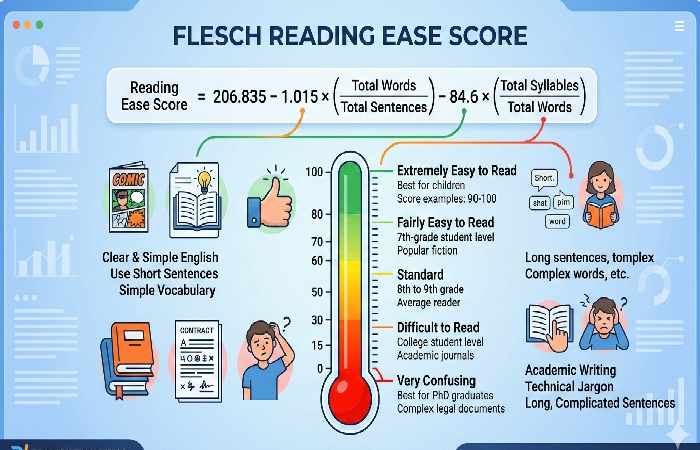
The Flesch Reading Ease score is a readability formula that measures how easy your writing is to understand. It analyzes sentence length and word complexity, then produces a score between 0 and 100.
Higher scores = easier to read.
A score of 60-70 is considered ideal for most web content, as it matches the reading level of the average adult (around 8th-9th grade education level).
Understanding Readability Measurement
Readability isn’t about intelligence—it’s about accessibility. Even highly educated readers prefer clear, concise writing when scanning content online.
The Flesch Reading Ease test gives you an objective way to measure clarity. Instead of guessing whether your content is approachable, you get a numerical benchmark.
The History Behind Flesch Reading Ease
Rudolf Flesch, an Austrian-born readability expert, developed this formula in the 1940s while consulting for the Associated Press. His goal was to help journalists write more accessible news articles.
The formula gained widespread adoption when the U.S. Navy used it in the 1970s to simplify technical training manuals. Today, it’s integrated into tools like Yoast SEO, Microsoft Word, and Hemingway Editor, making it the most widely used readability metric worldwide.
How Is Flesch Reading Ease Calculated?
The Flesch Reading Ease formula looks complex at first glance, but it’s based on two simple factors: sentence length and word length.
The Flesch Reading Ease Formula Explained
206.835 – 1.015 (total words ÷ total sentences) – 84.6 (total syllables ÷ total words)
That’s it. The formula subtracts penalties for long sentences and complex words from a base score of 206.835.
Breaking Down the Formula Components
Let’s decode each part:
- Average Sentence Length (ASL)
- Total words ÷ total sentences
- Multiplied by 1.015
- Longer sentences = lower score
- Average Syllables per Word (ASW)
- Total syllables ÷ total words
- Multiplied by 84.6
- Words with more syllables = lower score
Example Calculation:
Text: “The cat sat on the mat. It was comfortable.”
- Total words: 10
- Total sentences: 2
- Total syllables: 11
ASL = 10 ÷ 2 = 5
ASW = 11 ÷ 10 = 1.1
Score = 206.835 – (1.015 × 5) – (84.6 × 1.1)
Score = 206.835 – 5.075 – 93.06
Score = 108.7
This extremely simple text scores above 100, indicating very easy readability.
Flesch Reading Ease Score Interpretation
Understanding your score is essential for improvement. Here’s what the numbers mean.
The 0-100 Scoring Scale
| Score Range | Readability Level | School Grade | Audience | Example Content Type |
| 90-100 | Very Easy | 5th grade | Children | Children’s books |
| 80-89 | Easy | 6th grade | General public | Casual blogs |
| 70-79 | Fairly Easy | 7th grade | Average adult | Web content |
| 60-69 | Standard | 8th-9th grade | Most adults | Business content |
| 50-59 | Fairly Difficult | 10th-12th grade | Educated adults | News articles |
| 30-49 | Difficult | College level | Specialists | Technical writing |
| 0-29 | Very Difficult | Graduate level | Experts | Academic papers |
What Score Should You Aim For?
For most web content, aim for 60-70.
This range ensures your content is accessible to the broadest audience without appearing oversimplified. It matches how most successful online publications write.
Why not aim higher?
Scores above 80 can feel too basic for professional contexts. Readers may question your expertise if every sentence is elementary.
Why not go lower?
Scores below 50 alienate casual readers. They’ll bounce before finishing your first paragraph.
Score Targets by Industry and Audience
Not all content needs the same score. Adjust based on your audience:
E-commerce & Retail (65-75)
- Product descriptions need clarity for quick scanning
- Higher scores reduce purchase hesitation
SaaS & Technology (55-65)
- Balance technical accuracy with accessibility
- Educated audience tolerates some complexity
Healthcare & Medical (50-60)
- Simplify patient-facing content (60-70)
- Professional content can be lower (50-60)
Legal & Finance (40-55)
- Precision matters more than ease
- Use glossaries for complex terms
Academic & Research (30-50)
- Expert audiences expect sophisticated language
- Don’t sacrifice accuracy for readability
News & Media (60-70)
- Match the Associated Press standard
- Broad audience demands clarity
Flesch Reading Ease vs Flesch-Kincaid Grade Level
These two tests are often confused, but they measure readability differently.
Key Differences Between the Two Tests
| Aspect | Flesch Reading Ease | Flesch-Kincaid Grade Level |
| Score Range | 0-100 (higher is easier) | 1-18+ (matches US grade levels) |
| Interpretation | Requires conversion table | Direct grade level |
| Use Case | General readability check | Educational content matching |
| Formula | 206.835 – 1.015 ASL – 84.6 ASW | 0.39 ASL + 11.8 ASW – 15.59 |
Example:
A text with a Flesch Reading Ease score of 65 equals a Flesch-Kincaid Grade Level of 8.
Both indicate 8th-grade reading level, but the presentation differs.
When to Use Each Formula
Use Flesch Reading Ease when:
- You need a quick snapshot of overall readability
- You’re optimizing web content for SEO
- You want to track improvement over time
Use Flesch-Kincaid Grade Level when:
- You’re creating educational materials
- You need to match specific curriculum standards
- You’re writing for a defined education level
Most SEO tools default to Flesch Reading Ease because the 0-100 scale is more intuitive.
Why Flesch Reading Ease Matters for SEO
Google doesn’t directly use Flesch scores as a ranking factor, but readability impacts the signals Google does measure.
Readability’s Impact on User Experience
Clear writing improves user experience, which is a confirmed ranking factor. When readers easily understand your content, they:
- Stay on your page longer (dwell time)
- Click through to other pages (internal engagement)
- Share your content (social signals)
- Return to your site (repeat visits)
All of these behaviors signal quality to search engines.
How Reading Ease Affects Engagement Metrics
Studies show direct correlations between readability and engagement:
- Bounce rate decreases 15-20%when content matches reader comprehension levels
- Time on page increases 40%for content scoring 60-70 vs 30-40
- Conversion rates improvewhen call-to-action copy is clear and direct
Mobile users especially benefit from higher readability scores. Smaller screens make complex sentences harder to follow.
Google’s Stance on Readability
Google’s Quality Rater Guidelines emphasize “helpful content for users.” While they don’t mention Flesch specifically, they explicitly value:
- Clear, well-written content
- Information presented in an easy-to-consume format
- Content that serves the reader’s needs efficiently
Readable content aligns perfectly with Google’s Helpful Content Update priorities.
How to Improve Your Flesch Reading Ease Score
Improving your score doesn’t mean dumbing down your content. It means communicating more efficiently.
Shorten Your Sentences
The Problem:
Long sentences force readers to hold multiple ideas in their heads simultaneously, increasing cognitive load and reducing comprehension speed, especially when scanning on mobile devices.
The Solution:
Break complex ideas into separate sentences.
Example Before (Score: 42 – Difficult):
“Content marketing strategies that leverage advanced SEO techniques, including semantic keyword optimization and comprehensive competitor analysis, typically require significant time investment and expertise, but the long-term results in terms of organic traffic growth and brand authority establishment justify the initial effort.”
Example After (Score: 68 – Standard):
“Content marketing strategies require time and expertise. They leverage advanced SEO techniques like semantic keywords and competitor analysis. The initial effort pays off. You’ll see organic traffic growth and stronger brand authority over time.”
Target: Keep most sentences under 20 words.
Simplify Your Word Choice
The Problem:
Words with many syllables slow reading speed and reduce accessibility.
The Solution:
Choose simpler synonyms when precision isn’t compromised.
Simple Swaps:
| Complex | Simple |
| utilize | use |
| approximately | about |
| facilitate | help |
| endeavor | try |
| terminate | end |
| commence | start |
| demonstrate | show |
| acquire | get |
| numerous | many |
| subsequently | then |
Exception: Don’t replace specialized terms when writing for expert audiences. “Cardiomyopathy” belongs in medical content, even if it hurts your score.
Before and After Examples
Example 1: E-commerce Product Description
Before (Score: 47):
“This exceptionally crafted timepiece utilizes Swiss-engineered mechanical movements to deliver unparalleled precision and reliability, making it the quintessential accessory for discerning individuals who appreciate horological excellence.”
After (Score: 71):
“This watch features Swiss-made mechanical movements for precise timekeeping. It’s built for people who value quality craftsmanship and reliable performance.”
Example 2: Blog Introduction
Before (Score: 38):
“The implementation of comprehensive email marketing automation sequences represents a transformative opportunity for organizations seeking to enhance customer engagement metrics while simultaneously reducing operational overhead and resource allocation inefficiencies.”
After (Score: 64):
“Email automation helps businesses engage customers more effectively. It saves time and reduces costs. Here’s how to set up automated sequences that work.”
Common Mistakes to Avoid
Mistake #1: Sacrificing Accuracy for Simplicity
Don’t remove necessary technical terms. Instead, explain them clearly.
Mistake #2: Making Every Sentence the Same Length
Variety keeps readers engaged. Mix short, punchy sentences with slightly longer ones.
Mistake #3: Removing Transition Words
Words like “however,” “therefore,” and “additionally” add clarity, even if they add syllables.
Mistake #4: Ignoring Context
A legal disclaimer should score lower than a blog post. Don’t force every piece into the same range.
Mistake #5: Over-Optimizing
Obsessing over a perfect score creates robotic writing. Aim for the target range, not perfection.
Best Tools to Calculate Flesch Reading Ease
You don’t need to calculate scores manually. These tools automate the process.
Yoast SEO Plugin
Platform: WordPress
Cost: Free (basic), Premium ($99/year)
Yoast integrates Flesch Reading Ease directly into the WordPress editor. You see real-time scores as you write.
Pros:
- Automatic scoring in the editor
- Color-coded feedback (red/orange/green)
- Specific improvement suggestions
Cons:
- WordPress-only
- Doesn’t explain whyyour score is low
Best For: Bloggers and content marketers using WordPress.
Hemingway Editor
Platform: Web, Desktop
Cost: Free (web), $19.99 (desktop)
Hemingway highlights complex sentences and suggests simpler alternatives. It shows Flesch-Kincaid Grade Level instead of Reading Ease.
Pros:
- Visual highlighting of problem areas
- Identifies passive voice and adverbs
- Clean, distraction-free interface
Cons:
- Shows Grade Level, not Reading Ease
- Sometimes over-simplifies suggestions
Best For: Writers who want sentence-level feedback.
Readable.com
Platform: Web, API
Cost: Free trial, plans from $4/month
Readable provides detailed analytics including Flesch Reading Ease, Grade Level, and multiple other readability formulas.
Pros:
- Multiple readability metrics
- Website scanning capabilities
- API for bulk analysis
Cons:
- Requires subscription for regular use
- Interface can feel overwhelming
Best For: Agencies managing multiple client sites.
Free Online Calculators
Platforms: WebFX, Readable.io, Online-Utility.org
Cost: Free
Paste your text, get instant scores. No account needed.
Pros:
- No registration required
- Instant results
- Multiple formulas available
Cons:
- No improvement suggestions
- No content storage
- Limited features
Best For: Quick one-time checks.
Limitations of the Flesch Reading Ease Test
The Flesch formula is powerful but not perfect. Understanding its limitations prevents misuse.
What the Score Doesn’t Measure
- Context and Meaning
The formula counts syllables and sentences. It doesn’t understand whether your content makes sense.
“Big dog ran. Cat sat. Sun hot.” scores very high but communicates poorly.
- Audience Knowledge
A medical blog for doctors should use medical terminology, even if it lowers the score. - Engagement Quality
A high score doesn’t guarantee interesting content. Boring simple writing still bores readers. - Visual Design
Subheadings, bullet points, and white space improve readability but don’t affect Flesch scores. - Cultural Context
Flesch was designed for English. Translations and multilingual content won’t score accurately.
When You Should Ignore Your Score
Legal Documents
Precision and defensibility matter more than ease.
Academic Writing
Peer-reviewed papers require sophisticated language and specialized terminology.
Technical Documentation
API documentation for developers needs exact phrasing, not simple phrasing.
Poetry and Creative Writing
Artistic expression shouldn’t be constrained by readability formulas.
Specialized Professional Content
Writing for experts in finance, medicine, or law requires field-specific language.
The Rule:
If simplifying would compromise accuracy or alienate your target audience, ignore the score.
Frequently Asked Questions
What is a good Flesch Reading Ease score?
For most web content, aim for 60-70. This range is accessible to the average adult reader without appearing overly simplistic. Content for children should score 80+, while academic or technical content may appropriately score 30-50.
How do I calculate my Flesch Reading Ease score?
Use the formula: 206.835 – 1.015 (words ÷ sentences) – 84.6 (syllables ÷ words). Alternatively, use free tools like Yoast SEO, Hemingway Editor, or online calculators that compute scores automatically.
Is a higher Flesch Reading Ease score better?
Yes, higher scores indicate easier readability. Scores near 100 are extremely easy (elementary level), while scores near 0 are very difficult (graduate level). Most web content performs best between 60-70.
What’s the difference between Flesch Reading Ease and Flesch-Kincaid Grade Level?
Both measure readability using the same factors (sentence and word length) but present results differently. Reading Ease uses a 0-100 scale where higher is easier. Grade Level corresponds to US school grades (e.g., Grade 8 = 8th-grade reading level).
Does Flesch Reading Ease affect SEO rankings?
Not directly. Google doesn’t use Flesch scores as a ranking factor. However, readable content improves user experience metrics like dwell time, bounce rate, and engagement—all of which influence rankings indirectly.
Can I improve my score without dumbing down my content?
Absolutely. Break long sentences into shorter ones without changing meaning. Replace unnecessarily complex words with simpler synonyms. Keep technical terms when needed for accuracy—just explain them clearly.
What tools can check Flesch Reading Ease automatically?
Yoast SEO (WordPress plugin), Hemingway Editor (web/desktop app), Readable.com (web platform), Microsoft Word (built-in review tool), and various free online calculators all provide automatic Flesch scoring.
Why does my technical content score low?
Technical content naturally contains specialized terminology and complex sentence structures. This is appropriate for expert audiences. Don’t sacrifice accuracy for a higher score—instead, focus on clarity within your field’s standards.
Conclusion
The Flesch Reading Ease score provides a practical, objective measure of content accessibility. By analyzing sentence length and word complexity, it helps you identify opportunities to communicate more clearly without sacrificing substance.
For most web content, target a score between 60-70. Use tools like Yoast SEO or Hemingway Editor to track your progress. Focus on shortening sentences and choosing simpler words when precision isn’t compromised.